
Azure DevOps Organization
Your organization in Azure DevOps is the top-level entity for your Git-Zen integration. Git-Zen uses it for every call to Azure DevOps. If the name is wrong, Git-Zen cannot see your projects.
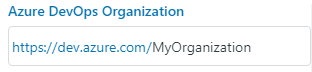
The field is at the top of the Git-Zen Settings screen. Enter only the organization name. For https://dev.azure.com/contoso, enter contoso.
When you authorize Git-Zen, Git-Zen fills in this field with the first organization that your account belongs to. It does this only when the field is empty. If your account belongs to more than one organization, check the name.
When you change the organization and save, Git-Zen reloads the project list on the Webhooks screen. Select your projects again for the new organization.