
Azure DevOps: Work Item Types
Full Version Only
Choosing Allowed Types
Section titled “Choosing Allowed Types”Azure DevOps has many work item types, and each project can have its own set. You may want your agents to create and link only certain types.
In the Git-Zen settings, find Available Work Item Types. Select the types that agents can use. For example, you can limit agents to “Bug” and “Feature”.
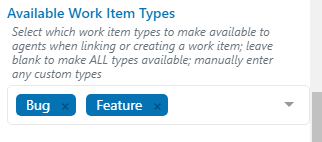
This setting controls two lists:
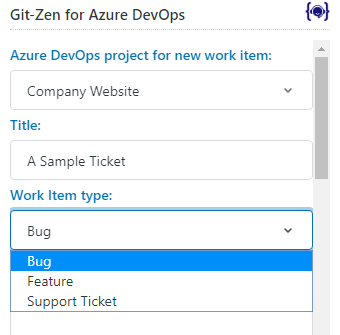
- The work item type drop-down list on the “Create Work Item” screen.
- The work items on the “Link Work Item” screen. Git-Zen shows only work items of the allowed types.
How Git-Zen Builds the Type List
Section titled “How Git-Zen Builds the Type List”When an agent selects a project on the “Create Work Item” screen, Git-Zen asks Azure DevOps for that project’s work item types. It leaves out disabled types.
- If you have not set Available Work Item Types, the agent sees every enabled type in the project.
- If you have set it, the agent sees only the types that are in both your list and the project. The match ignores case.
- If no type is in both, Git-Zen shows your whole list instead. Azure DevOps then rejects a type that the project does not have.
If only one type is available, Git-Zen selects it and does not show a drop-down list.
Adding Custom Work Item Types
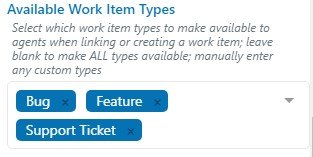
Section titled “Adding Custom Work Item Types”The drop-down list suggests common types. If you use a custom work item type, type its name in Available Work Item Types and press Enter. In this example, a custom type named “Support Ticket” was added:
When an agent starts a new work item, only these types are available:
Default Work Item Type
Section titled “Default Work Item Type”Under “Options for new work items”, Default work item type sets the type that Git-Zen selects first. The choices come from Available Work Item Types. If you choose “(last used)”, Git-Zen selects the type that the agent used last.
When the agent changes the type, Git-Zen reloads the custom fields, Priority, and Severity for that type.