
Roles and Permissions
Full version only.
You can limit which Zendesk roles see the Git-Zen app in Zendesk. Git-Zen also lets you use Zendesk roles to control what each agent can do inside Git-Zen.
Git-Zen has four permission levels. You assign a level to each Zendesk role. An agent can then use only the Git-Zen settings and actions that their role’s level allows.
Permission levels
Section titled “Permission levels”| Level | Access |
|---|---|
| Administrator | All Git-Zen settings and functions |
| Standard | All functions, but no settings |
| Limited | Can link existing issues only |
| Read-Only | Can view linked items only, and cannot take actions |
What each level can do
Section titled “What each level can do”The same levels apply on every platform. “Issue” means issue or work item.
| Feature | Administrator | Standard | Limited | Read-Only |
|---|---|---|---|---|
| View linked issues and commits | ✅ | ✅ | ✅ | ✅ |
| Open the issue link | ✅ | ✅ | ✅ | ❌ |
| Open the Help screen | ✅ | ✅ | ✅ | ❌ |
| Link an existing issue | ✅ | ✅ | ✅ | ❌ |
| Add labels while linking | ✅ | ✅ | ❌ | ❌ |
| Create a new issue | ✅ | ✅ | ❌ | ❌ |
| Post a comment to a linked issue | ✅ | ✅ | ❌ | ❌ |
| Edit labels on a linked issue | ✅ | ✅ | ❌ | ❌ |
| Edit lists (unlink items) | ✅ | ✅ | ❌ | ❌ |
| Open Settings | ✅ | ❌ | ❌ | ❌ |
| Open the Webhooks screen | ✅ | ❌ | ❌ | ❌ |
| Configure tag/label pairs | ✅ | ❌ | ❌ | ❌ |
| Edit field tooltips | ✅ | ❌ | ❌ | ❌ |
| View billing information | ✅ | ❌ | ❌ | ❌ |
Fields that you set while you create an issue, such as milestone, cycle, or project, follow the Create a new issue row.
Some Help actions also need the Zendesk Admin or Owner role, in addition to the Administrator level: Re-Authorize Your Token, the manual webhook URLs, and the Git-Zen tour.
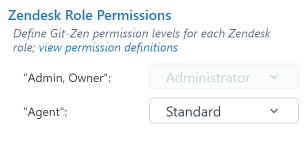
Assign a level to a Zendesk role
Section titled “Assign a level to a Zendesk role”- Click Settings on the Git-Zen menu bar.
- Scroll to Zendesk Role Permissions.
- Next to each Zendesk role, choose a permission level.
- Click Save.
Common assignments
Section titled “Common assignments”| Zendesk role | Typical Git-Zen level | Why |
|---|---|---|
| Admin or Owner | Administrator | Full control (enforced) |
| Staff or Agent | Standard | Can create, link, and comment, but cannot change settings |
| Light Agent | Limited | Can read context and link existing issues, but cannot create new ones |
| Custom “Contractor” role | Read-Only | Can see engineering activity without taking actions |
Git-Zen roles and platform permissions
Section titled “Git-Zen roles and platform permissions”Git-Zen roles control what agents can do inside Git-Zen and Zendesk. They do not grant or limit access to your platform. The authorizing OAuth user controls that access.
If the OAuth user can write to a repository or project, every Git-Zen agent at Standard or above can create and edit issues there. They do not need their own account on the platform. If the OAuth user has read access only, no Git-Zen action can write, even for an Administrator.
Keep this in mind when you choose the account that authorizes Git-Zen. A low-permission service account is a good way to limit what Git-Zen can do across your workspace.
See GitHub OAuth user.
GitLab requires the Maintainer role or higher on a project to create webhooks. If the OAuth user has only Developer access, Git-Zen can list the project and its issues. But it cannot enable the Git-Zen webhook for that project. Raise the user’s role on the group or project in GitLab, then re-authorize Git-Zen. See GitLab OAuth user and Group authorization.
See Jira OAuth user.
Git-Zen requests the admin scope during Linear authorization, so that it can create the workspace webhook. Ask a Linear workspace Admin to authorize. If the user cannot grant the scope, Git-Zen receives no events from Linear.
Linear also allows only one assignee per issue. This is a Linear limit, not a Git-Zen permission. See Linear OAuth user.