
Zendesk Tags
Full version only.
Zendesk tags are useful for reports, triggers, and workflow. Git-Zen can add tags to a Zendesk ticket when its linked issue or work item changes. It can also solve the ticket when the item closes.
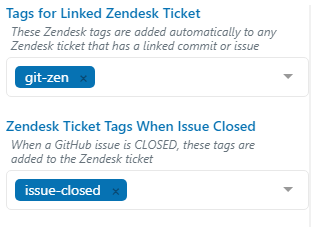
Tags for linked tickets
Section titled “Tags for linked tickets”Tags for Linked Zendesk Ticket: Git-Zen adds these tags to a ticket when an event from a linked issue, work item, or commit updates the ticket. Git-Zen adds them only if the ticket does not have them yet.
When you save, Git-Zen removes characters that are not letters, numbers, _, ., -, :, or / from these tags.
Tags when an item closes
Section titled “Tags when an item closes”Zendesk Ticket Tags when Issue Closed: When a linked issue closes, Git-Zen adds these tags to the linked Zendesk ticket. This works well with Zendesk triggers that take the next step. When you save, Git-Zen removes characters that are not letters, numbers, _, ., or - from these tags.
Git-Zen adds the closed-issue tags when a GitHub issue closes. It adds the linked-ticket tags for issue and commit events.
Git-Zen adds the closed-issue tags when a GitLab issue closes. It adds the linked-ticket tags for issue and commit events.
The setting is called Zendesk Ticket Tags when Work Item Closed. Git-Zen adds the tags when the linked work item moves to the state Closed, Completed, or Done. Other state names, even custom closed states, do not count. It adds the linked-ticket tags for work item and commit events.
The setting is called Zendesk Ticket Tags when Issue Closed. Git-Zen adds the tags when a Jira issue moves into any status in the Done category. Git-Zen does not currently add the linked-ticket tags for Jira events.
Git-Zen adds the closed-issue tags when a Linear issue moves into a state of type completed or canceled, for example the tag linear-done. See Linear workflow states. Git-Zen does not remove the tags when the issue reopens.
Git-Zen does not currently add the linked-ticket tags for Linear events. To tag tickets that have a Linear issue, use a Zendesk trigger on the Git-Zen_data custom field, or use the closed-issue tags.
Other integrations. The same settings work for Trello, ClickUp, Notion, monday.com, and Asana.
Git-Zen treats an item as closed in these cases:
- Trello: a card is archived. Moving a card to a “Done” list does not count.
- ClickUp: a task moves into a status of type closed or done.
- Notion: a page’s Status property moves into the Complete group. Notion also treats the Canceled group as closed. A plain select property never counts. A page that was already complete when you linked it does not count.
- monday.com: an item’s status label that the board marks as done (usually Done) is set. If monday.com does not send the done flag, Git-Zen checks for the label text “Done”.
- Asana: a task is marked complete.
Git-Zen acts when the item moves into the closed state. It does not act again if the item stays closed. For more on these platforms, see Other integrations.
Solve the ticket when an item closes
Section titled “Solve the ticket when an item closes”Turn on Solve Zendesk ticket when issue is closed to set the linked ticket to Solved when the item closes. This works on every platform, including Trello, ClickUp, Notion, monday.com, and Asana. Each platform has its own meaning of closed, listed above.
- Git-Zen does not change a ticket that is already solved or closed.
- Git-Zen does not solve a ticket that has no assignee, because many Zendesk accounts require one. To solve these tickets too, enter a Zendesk user ID in Fallback Zendesk Assignee ID. Git-Zen assigns the ticket to that user, then solves it. The user ID is the number in the URL of the user’s profile,
/agent/users/<id>.
Tags on closed tickets
Section titled “Tags on closed tickets”Zendesk normally refuses tag updates on closed tickets. See Updates to closed tickets.